Talk & Translate AI Translator
- 4.6
- Rating
- 5.00M
- Installs
- Free
- Price
 Analysis by App-foxy
I like translation apps most when they solve a small problem quickly instead of making me think about the technology behind them. Talk & Translate AI Translator, developed by MobiSystems, is designed around that idea: it brings together voice, text, and photo translation in one Books & Reference app, with support for more than one hundred languages and offline use. That combination makes it more practical than a simple phrasebook, especially when I am moving between conversations, signs, menus, and written messages.
The app is free to install and suitable for Everyone, which makes it easy to try without committing money first. Its average rating is 4.6 from around thirteen thousand ratings, and it has passed five million installs. Those figures suggest that it has found a broad audience, but they do not automatically mean it will suit every traveler, student, or multilingual household. My experience is that its usefulness depends heavily on how you plan to translate and whether you are comfortable with the limits of automated language tools.
How Talk & Translate fits into everyday translation
I find Talk & Translate most useful when translation needs change from one moment to the next, rather than staying on a single page or phrase. In this section, I look at how its voice, text, and photo options can fit into a real day, and why a little preparation makes switching between them smoother.
You May Also Like

 Blood Strike: 2.5 Anniversary
Blood Strike’s Loadouts Turn Every Drop Into a Tactical Gamble
A close look at Blood Strike’s custom loadouts: how fast access to signature weapons reshapes its battle royale rhythm, rewards preparation, and narrows the gap between fights.

 Pandora - Music & Podcasts
Pandora’s Music Is Easy to Start, but Harder to Recover
Pandora’s strength is its low-effort path from a seed to a station. Its weak spot is how much confidence it asks you to place in connection, setup, and quiet recovery.

 8 Ball Pool
 Is Built on Rivalries, Rematches, and Routine
A close look at the rivalries, rematches, shared routines, and unanswered safety questions that turn a quick pool match into a persistent mobile community.

 Samsung Music
’s Quiet Strength Is Playing What You Already Own
Its reach comes less from spectacle than from dependable access to a personal library. That simplicity is both the app’s strongest retention engine and its ceiling.

 AccuWeather: Weather Radar
AccuWeather Review: A Quick, Clear Forecast for Everyday Decisions
For everyday plans, the best forecast is the one you can understand quickly. AccuWeather makes rain timing, radar, and local conditions easy to act on, with a few trade-offs.

 Hill Climb Racing
Why Hill Climb Racing Still Turns Crashes Into One More Run
A tiny car, a bumpy hill and one more upgrade: Hill Climb Racing keeps resurfacing because its simple chaos makes every near-miss feel personal.
More From Our News Desk



One app for spoken, written, and photographed language
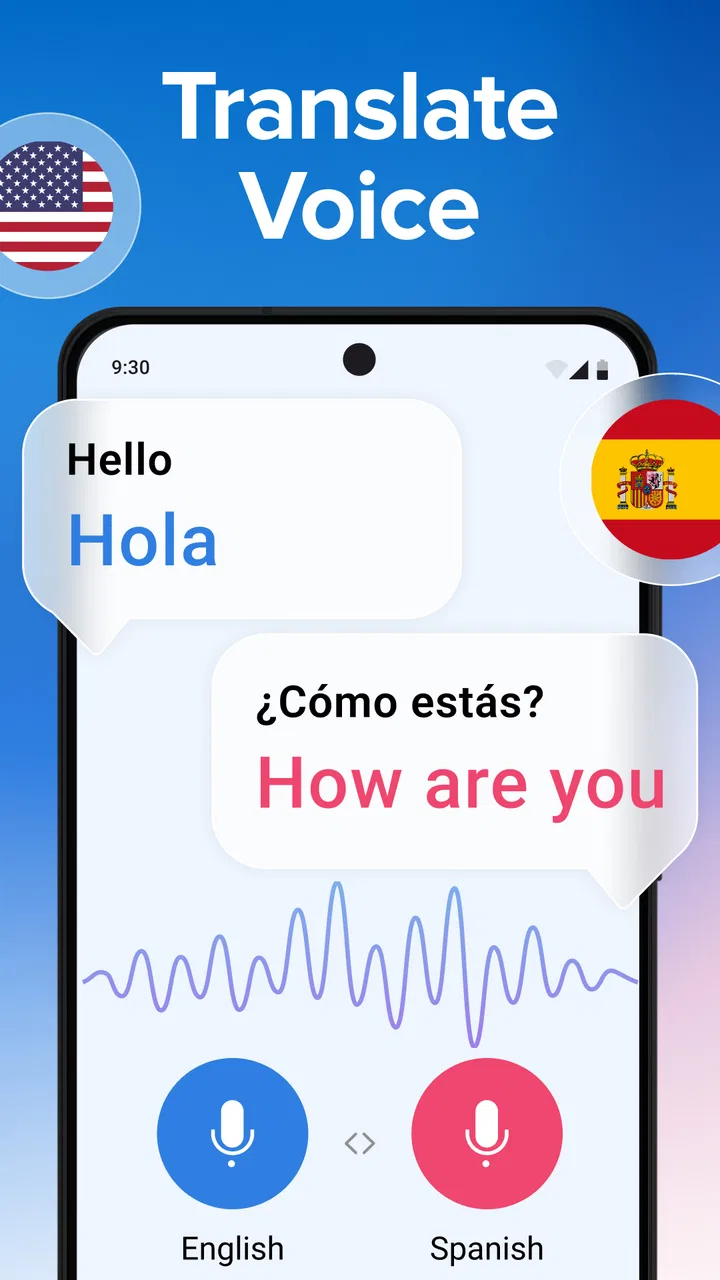
The strongest part of the design is the variety of input methods. If I need to understand a sentence someone has just spoken, voice translation is the natural starting point. If I already have a message, note, or short passage in front of me, typing is less awkward. When the words are printed on a menu, notice, label, or sign, the photo option can save the time of entering everything manually.
That flexibility matters because real translation rarely stays in one format. A traveler might photograph a train notice, ask a hotel employee a question by voice, then type an address into the app. Switching between separate tools for each task is slower and creates more opportunities to choose the wrong language or lose the context. Here, the three workflows sit in the same general place, so I can move from one to another as the situation changes.
The offline capability is particularly useful in places where mobile data is unreliable, expensive, or unavailable. I would prepare before leaving by checking which language resources are available for offline use and setting up what I expect to need while connected. That preparation is more important than simply assuming that every language behaves identically without an internet connection. Offline translation can be a valuable safety net, but I would still test the languages and phrases relevant to my trip before depending on them.
A realistic travel workflow
Imagine arriving in a city where I do not speak the local language. At a café, I can use the camera to work through a menu rather than pointing at random dishes. Later, if a station announcement or printed instruction is difficult to understand, a photo gives me another route. If I need to ask for directions, speaking into the app is faster than composing a sentence. Finally, typing is useful when I need to check a specific name, address, or phrase without creating a noisy conversation.
That sequence shows why this is more than a basic dictionary. It is not just about finding an equivalent word; it is about choosing the least inconvenient way to deal with language at a particular moment. The practical tip I would give is to keep the app ready before the conversation begins. Opening the correct mode, selecting the languages, and checking offline access in advance is much less stressful than doing all of that while someone is waiting for an answer.
Where the AI approach helps, and where it needs supervision
The AI positioning is helpful when a sentence needs to be interpreted rather than matched word for word. Everyday speech often includes incomplete phrases, casual wording, and context that a traditional phrasebook cannot handle well. Still, I would treat any automated translation as assistance, not as a final authority. A translation that sounds fluent can still miss a cultural nuance, soften a warning, or choose an unsuitable meaning for a word with several interpretations.
For casual travel, quick reading, and ordinary exchanges, that trade-off is usually acceptable. For legal documents, medical instructions, financial commitments, or sensitive personal conversations, I would use a qualified human translator or a trusted professional source instead. The app can help me understand the general situation, but convenience should not be confused with guaranteed accuracy.
What the free access really means
I’d judge the free access by testing the language pair and task I actually expect to use, not by assuming every feature will matter to me. The next section considers how to try it thoughtfully, including what I’d check before deciding whether an in-app purchase is worthwhile.
Trying it costs nothing, but advanced value may cost more
Talk & Translate AI Translator is listed as free, so I can install it and assess the basic experience without paying an entry fee. That is important for a translation tool because the right choice depends on language combinations, travel habits, and comfort with the interface. I prefer being able to test an app in a real situation before deciding whether it deserves a place on my phone.
The app also includes in-app purchases ranging from $3.99 to $39.99 per item. I would therefore separate two questions: whether the free access is useful, and whether any paid option offers enough extra value for my own routine. The purchase range tells me that some capabilities or access levels may be positioned above the free experience, but I would inspect the exact purchase description shown in the app before spending money. A translation app is only good value when the paid part solves a problem I actually have.
For a short trip, occasional phrase checks, or a first trial, free access may be enough. Someone who translates repeatedly, needs dependable offline preparation, or uses the app as a regular communication aid may find more reason to consider a purchase. I would not pay simply because the app supports many languages; I would pay only after confirming that the languages and functions I need are available in the relevant access level.
How to judge the value before buying
My approach would be simple. First, try the exact language pair that matters to me. Then test a spoken sentence, a typed sentence, and a photograph containing real text. If I am traveling, I would repeat those checks with the phone offline. This reveals more than a general feature list because it shows whether the app fits my specific situation.
I would also consider frequency. A person who needs translation twice during a holiday has a different value calculation from someone who communicates across languages every week. The free installation removes much of the risk of testing, while the paid range makes it sensible to be deliberate rather than impulsive. The best value comes from matching the purchase to a repeated need, not from unlocking features I will rarely touch.
Version and device compatibility
The current version is 14.3.817, and the app requires Android 8.0 or later. That makes checking the operating system worthwhile before planning to use it on an older phone. On a supported device, I would also leave room for the app to function comfortably alongside the camera and microphone, since those are central to the voice and photo workflows.
Because this is an Android app, the experience will naturally depend on the phone itself. Camera quality affects photographed text, microphone performance affects spoken input, and a small or slow device can make switching between modes less pleasant. Those are not reasons to reject the app, but they are practical factors that can matter more than a feature list when translation is needed quickly.
Trade-offs I noticed during regular use
Using several input methods gives me flexibility, but it also means the quality of a result depends on the source: a noisy conversation and a clear typed phrase are very different tests. I’ll cover the small checks I use to reduce avoidable mistakes, along with situations where I would choose a more dependable alternative.
Convenience does not remove ambiguity
The app’s biggest strength, its ability to handle several kinds of input, is also where expectations can become too high. A camera can capture a menu, but unusual fonts, glare, curved packaging, handwriting, or crowded layouts can make the result harder to trust. Voice input can be affected by background noise, accents, interruptions, or people speaking over one another. Typing avoids some of those problems, but it takes longer and depends on me knowing how to enter the original wording correctly.
I get the most reliable results when I keep the input short and clear. Instead of presenting a long, complicated sentence in a noisy environment, I would break the request into smaller pieces and confirm important details. That is not as natural as a fluent human conversation, but it reduces the chance that one misunderstood phrase will affect everything that follows.
Offline use requires preparation
Offline translation is a major reason to consider this app, particularly while traveling. The trade-off is that offline access should be treated as something to prepare, not something to discover at the moment of need. Before leaving a reliable connection, I would open the relevant language settings, check what is available, and run a test with airplane mode enabled.
This is also where a physical phrasebook or saved notes can still be useful. A phrasebook is less flexible, but it does not depend on a battery, a camera, or an app interface. I would keep a few essential addresses, emergency phrases, and accommodation details available separately. Talk & Translate can be the main tool for exploration and conversation, while a backup reduces the consequences of a technical problem.
It is not a replacement for professional translation
I would not use an AI translator as the sole authority for contracts, prescriptions, immigration paperwork, or instructions where a misunderstanding could cause serious harm. Even a polished result may fail to preserve tone or legal meaning. The app is better suited to helping me participate in ordinary situations than to certifying the exact meaning of important documents.
There is a second limitation in social situations. Looking at a phone during a conversation can interrupt eye contact and make an exchange feel mechanical. For a quick question, that is a reasonable compromise. For a longer conversation, I would use short turns, repeat key details, and check that both people understood the result. The tool supports communication, but it cannot replace patience and human judgment.
How it compares with familiar alternatives
A conventional dictionary is better when I need definitions, pronunciation guidance, or careful study of one word. A phrasebook is better when I want ready-made expressions without depending on live input. A general search engine may be faster for a single phrase, while a human translator remains the better choice for high-stakes material.
Talk & Translate earns its place by combining voice, typing, and photo translation with offline support in one focused app. That makes it more adaptable than a phrasebook and more convenient than switching between separate tools. Its weakness is that the broader workflow can encourage me to trust an automated result too quickly. I would choose it for speed and range, not for formal precision.
Who will get the most value from it?
For me, this app makes the most sense when travel or everyday communication involves signs, spoken questions, and written details in the same stretch of time. The following section weighs that convenience against other needs, so you can tell whether this particular mix of translation tools matches your routine.
Good fit for travelers and practical everyday communication
I think the app is a strong match for travelers who expect several kinds of language problems during the same day. It is useful when reading signs, asking short questions, checking menus, and handling written details are all part of the trip. It also suits people who want one accessible starting point rather than a collection of specialized language tools.
Students can benefit from the ability to compare spoken and written language, especially when checking a phrase in context. Families may find the photo mode helpful for labels and notices, while people communicating with neighbors or relatives can switch between typed and spoken input depending on the conversation. The Everyone age rating also makes it broadly approachable for ordinary household use.
Who should choose something else
I would skip it if my main goal is serious language study. Translation helps me get the meaning across, but it does not automatically teach grammar, build a structured vocabulary, or replace lessons and deliberate practice. I would also look elsewhere if I need certified translations, detailed linguistic explanations, or a guaranteed human review.
It may not be the right purchase for someone who translates only once in a while and is satisfied with a basic free tool. Since paid items range from $3.99 to $39.99, I would first establish that the app’s particular workflow is noticeably more useful than the alternatives already available on the phone. The free starting point makes testing sensible, but payment should follow genuine repeated use.
My buy-or-skip verdict
After using it as a practical translation companion, I see Talk & Translate AI Translator as a flexible option for everyday situations rather than a universal language authority. Its combination of voice, text, photo input, support for more than one hundred languages, and offline capability gives it a clear advantage when a single translation method is not enough. MobiSystems has focused the app on the messy reality of travel and casual communication, where the format of the source changes constantly.
I would start with the free access, test the language pair and offline workflow I actually need, and keep a backup for essential information. If I were translating regularly and the paid access removed a recurring limitation, I would consider an in-app purchase after checking its exact terms. If my needs were occasional, academic, or high-stakes, I would stay with the free trial or choose a dictionary, course, phrasebook, or professional translator instead.
My recommendation is therefore positive but specific: choose Talk & Translate AI Translator when speed and input flexibility matter more than formal certainty. For a traveler who wants to photograph a sign, speak a question, and type a precise detail without juggling several apps, it can be genuinely useful. For contracts, medical decisions, or serious study, I would not make it the only tool. That balance is what makes the app worth trying without pretending that AI translation can replace human understanding.
FAQs for Talk & Translate AI Translator
01Is Talk & Translate AI Translator free to use?
Talk & Translate AI Translator offers a free version with basic features, making it accessible for casual users. However, more advanced features, such as offline translations and premium language packs, may require a subscription. It's recommended to review the app's pricing options in the app store for the latest information.
02Which languages are supported by Talk & Translate AI Translator?
The app supports a wide range of languages, making it ideal for both travelers and language learners. Common languages include English, Spanish, French, Chinese, and more. For a complete list of supported languages, users should check the app's description in the app store or within the app settings.
03How accurate is the translation provided by Talk & Translate AI Translator?
Talk & Translate AI Translator leverages advanced AI technology to provide accurate translations. While it's generally reliable for most common phrases and sentences, the accuracy can vary based on the complexity of the text and the languages involved. Users are advised to verify translations for critical communications.
04Does Talk & Translate AI Translator require an internet connection?
The app requires an internet connection for most features, including real-time audio translations. However, users can download specific language packs for offline use, ensuring functionality even when a connection isn't available. This feature is particularly useful when traveling abroad with limited internet access.
05Is Talk & Translate AI Translator easy to use for beginners?
Yes, Talk & Translate AI Translator is designed with a user-friendly interface that makes it accessible for beginners. The app provides straightforward navigation and intuitive controls, allowing users to easily select languages, input text, or use voice commands for translations. Tutorials and help sections are also available for additional guidance.
Pros
- Accurate translations across multiple languages.
- Real-time voice translation feature.
- User-friendly and intuitive interface.
- Offline mode for translations without internet.
- Customizable language pairs for frequent use.
Cons
- Limited free version with ads.
- Occasional delays in voice processing.
- Subscription needed for all features.
- Some languages lack complete offline support.
- Voice recognition can struggle with accents.

Talk & Translate AI Translator
Gallery